
Cleaning & Maintaining Your Zebra ZD421 Printers

Result of A Dirty Printhead

Why Cleaning Your Zebra Printhead Matters

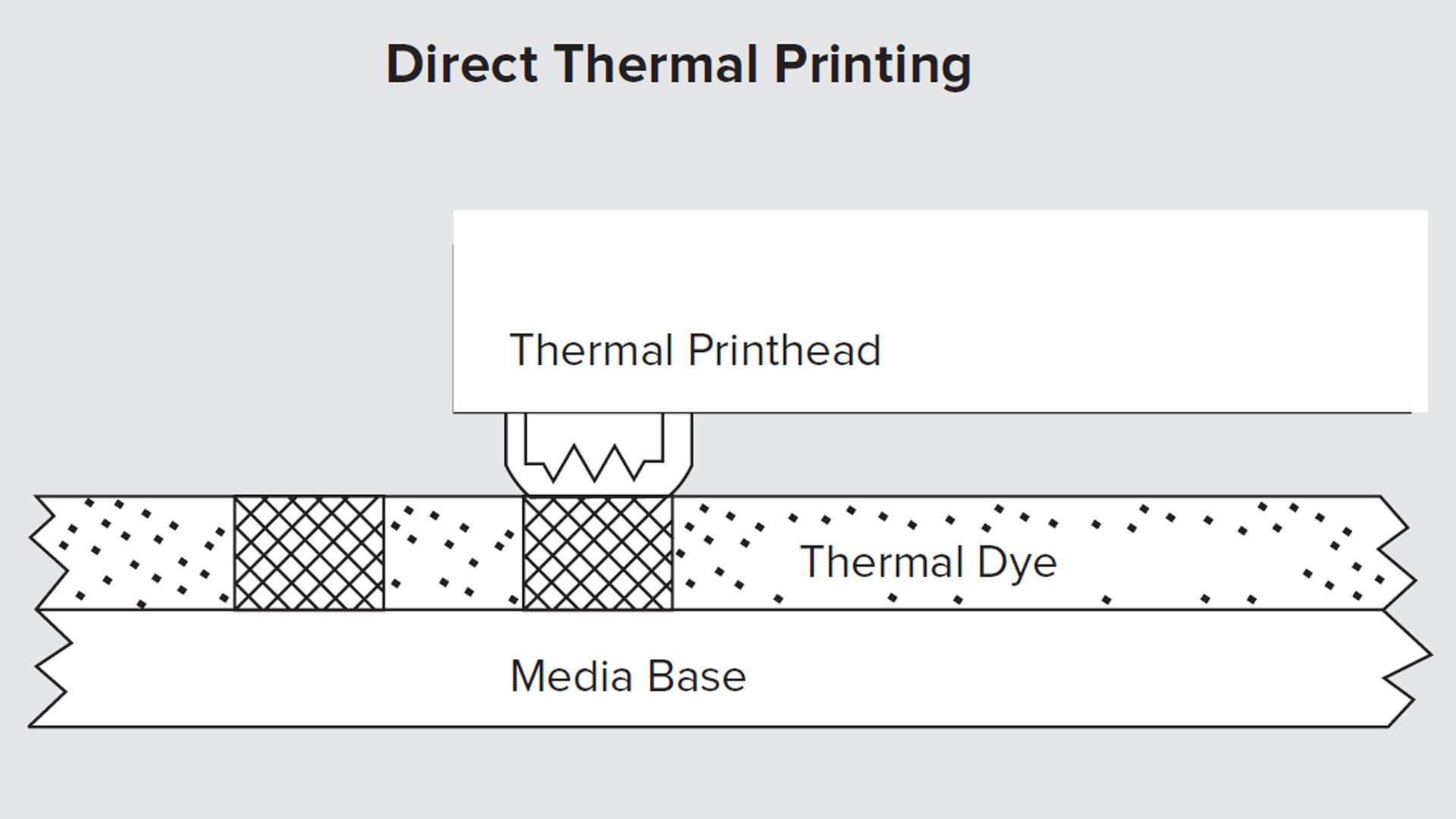
A dirty printhead results in poor heat transfer, that creates poorly printed images and barcodes.  Inconsistent print quality, such as voids in the graphics or barcodes may indicate a dirty printhead.  Which may result in barcodes that will not scan or scan incorrectly.

Best Practices

For optimum performance, the printhead should be cleaned regularly.  A Bar Code Business, Inc. recommends performing the cleaning procedure when installing a new rolls of ribbon, or after 3 rolls of label stock.


Items You Will Need:

  • Canned Air (Compressed Air)
  • Rubbing Alcohol (90%)
  • Q-Tips (Johnson & Johnson)
  • Cleaning Pen/Cleaning Cards (Optional)
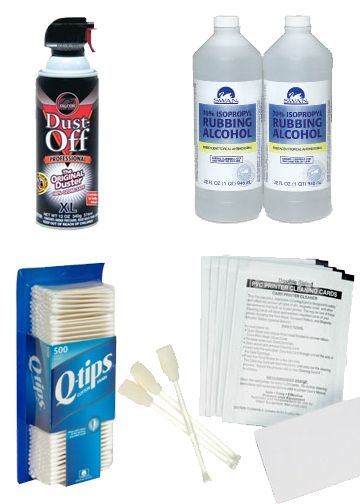
A collection of cleaning supplies, including compressed air, two bottles of rubbing alcohol, cotton swabs, and cleaning cloths.

Before You Start Cleaning Your Printhead...

Allow the printhead to cool for at least 1 minute.๏ปฟ


*Note: You are not required to turn off the printers power to perform this procedure.

If you turn off the power, you will lose all temporary settings, such as label formats, unprinted labels and you must reload them before you resume printing.


Another Important Cleaning Point...

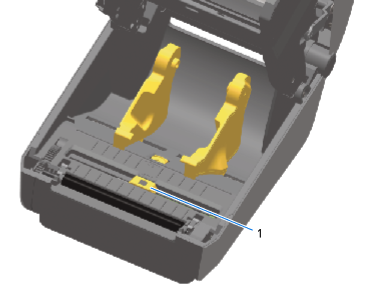
Now is a good time to clean another critical part of the printer, the printer sensors.  Remove labels & ribbon.  Blow out the sensors with canned air.


Recommended: After every 3 rolls of labels, inspect the media compartment for paper dust, lint or other foreign particles.  Using a soft bristled brush or vacuum, clean the media compartment.  Using a can of "compressed air" blow out any paper dust or particles out of the media sensors and away from the printer.


Precautionary:

  • Remove all rings, watches, hanging necklaces, identification badges or other jewelry that could touch the printhead or get caught in the printer.
  • Use NO stronger than 90% isopropyl alcohol on a cotton swab to clean the printhead elements from end to end (the print elements are located in the dark line on the printhead).
  1. Clean the window of the movable sensor by gently brushing away dust or using a can of compressed air. If necessary, use a dry swab to brush away dust.
  2. If adhesives or other contaminants remain, use a swab moistened with 99.7% pure isopropyl alcohol to break them up. Discard the used swab(s).
  3. Use a dry swab to remove any residue that may be left from the first cleaning.
  4. Repeat the preceding steps as required until all residue and streaks are removed from the sensor.๏ปฟ
Inside of a thermal label printer showing two yellow media holders and a movable sensor labeled

  1. If ribbon is installed, remove it before proceeding.
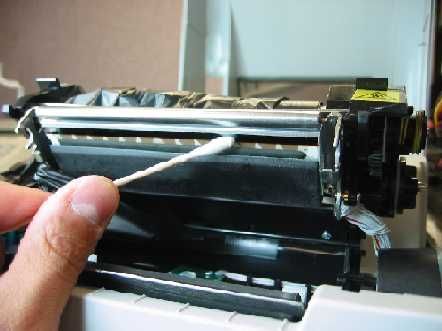
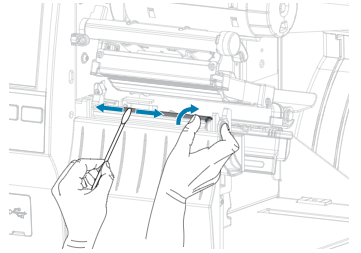
  2. Rub the cotton swap (with alcohol) or cleaning pen across the dark area of the printhead. Clean from the middle to the outside, to move adhesive transferred from the edges of media to the outside of media path.
  3. Wait one minute before closing the printer or loading ribbon to allow all components to dry.
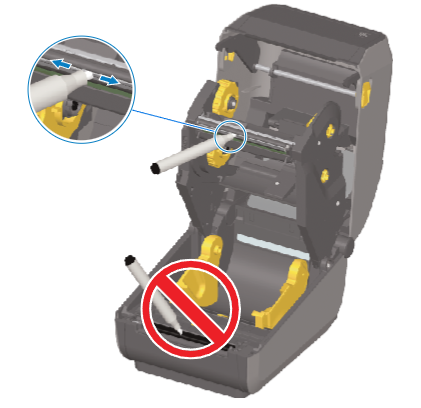
Inside of a thermal label printer showing two yellow media holders and a movable sensor labeled
A hand uses a cotton swab to clean a printer's internal metal print head mechanism.

Bonus Tip : Don't Forget The Platen Roller

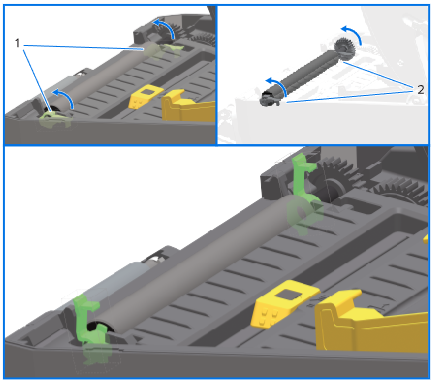
While you're inside the printer, take an extra 30 seconds to wipe down the Zebra platen roller (the rubber roller beneath the labels). Keeping the platen clean helps prevent label slippage, misfeeds, and blank label printing—all common issues in Zebra printer support calls.


  • The platen can be cleaned with a fiber and lint free swab (such as a Texpad swab) or a lint-free, clean, damp cloth very lightly moistened with 99.7% pure. medical-grade isopropyl alcohol.
  • Clean from the center out. Discard the used swab or cloth.
  • Repeat this process until all of the roller surface has been cleaned.
  • If there has been heavy adhesive build-up or label jam, repeat with a new swab to remove residual contaminants. (Adhesives and oils, for example, may be thinned by the initial cleaning but not completely removed.)๏ปฟ
A technical diagram showing the rotation of green locking levers to secure or release a roller inside a device tray.

More Information You May Like
By Erik Russell February 24, 2026
What Is the Difference Between Direct Thermal and Thermal Transfer Printing?
Advertisement for barcode solutions: A worker labels metal parts; text promotes improving operations with small label changes.
By Erik Russell February 11, 2026
Print Confident. Print Quality. Print Zebra.
Banner: Top 3 reasons to replace G-Series printers with ZD Series. A black printer with a screen is shown.
By Erik Russell February 11, 2026
We’ve infused the quality and reliability you expect from your G-Series printers, and advanced the legacy with more connectivity, features, performance and security. Be confident that Zebra’s ZD Series is ready to take on the job—and deliver above and beyond. ๏ปฟ
Logo for Go Zebra trade-in program; black text and arrows on a white background.
By Erik Russell February 11, 2026
Yesterday’s technology is no match for today’s challenges
person taking notes in a notebok
By sales May 19, 2025
bar code
By sales May 3, 2025
Bar code symbologies differ in the amount of data that can be encoded. Some symbologies (such as UPC) are fixed in length; other symbologies can encode truly variable data. Some bar code symbologies also contain various characteristics to minimize errors, such as self-checking characters, start and stop characters, check digits and error correction characters.
Man in warehouse scanning with tablet and barcode scanner.
By Lisa Renshaw May 3, 2025
Bar codes offer the simplest, most accurate, cost-effective method of data entry and collection. Compared to manual entry methods which possess an error rate of one in every 300 characters entered bar coding is virtually error-free. With less than one error per one million characters entered, bar coding offers numerous advantages over traditional, manual methods of data entry. Bar codes can be printed at a low cost with a wide variety of printing techniques. Symbols can be scaled to suit particular requirements, can be printed at very high speeds, and can be read by a variety of readily available reading/scanning equipment. Bar codes offer exceptional security, minimize errors and offer highly successful first-time read rates. Scanning a bar code brings speed and productivity improvements, and real-time data interchange (via radio frequency scanning equipment) allows timely information to be accessed almost instantly while the data is still current. Bar codes are frequently printed with human-readable text, which allows for simultaneous automatic and human decoding. Additionally, reduced labor costs, improved organizational productivity and profitability can be realized with the implementation and use of a bar coding system. Any process or procedure that involves manual entry can be made faster and more accurate by using bar codes. Summary: Accurate data collection Faster data entry Real-time collection and dissemination of data More effective use of human and physical resources Elimination of manual data entry/retrieval systems Bar codes typically employ a parallel arrangement of varying-width bars and spaces, arranged in a particular pattern to incorporate data. Both the black bars and white spaces in bar code symbols are used to enter and decode data. While some bar codes use the bar height and/or diameter to incorporate data, linear symbologies are the most common form of bar codes in use today. Linear bar code symbols use a single row of parallel bars and spaces to encode information. The term “Symbology” is a set of rules describing how the data is incorporated into the various arrangements of bars. Symbology refers to the bar code language. Each language has different capabilities, rules and characteristics, much like human language. Scanners are typically programmed to decode one or more different symbologies, and communication cannot occur unless the reading and printing equipment use compatible symbologies (i.e., a scanner programmed to decode Code 39 will not be able to decode Code 128). Bar code symbologies differ in the amount of data that can be encoded. Some symbologies (such as UPC) are fixed in length; other symbologies can encode truly variable data. Some bar code symbologies also contain various characteristics to minimize errors, such as self-checking characters, start and stop characters, check digits and error correction characters. ๏ปฟ
Green digital code matrix falling on black background.
By Erik Russell May 2, 2025
UPC Labels HOW TO APPLY FOR A UNIVERSAL PRODUCT CODE NUMBER (UPC RETAIL BAR CODE NUMBER)
Person facing a screen displaying streaming digital code in blue and white.
By Lisa Renshaw May 2, 2025
Bar Coding is an automatic identification (Auto ID) technology that streamlines identification and data collection. With some of its first concepts developed in the mid 1930s, bar coding has since grown into a $3.3-billion worldwide, multi-industry technology that is forecasted to grow annually by as much as 20% through the end of the century. Let's take a look at the history.